Free · open source · zero tracking

Every video on the page.
Saved in one click.

vdown-helper finds the videos, streams, subtitles and files a page plays — even inside embedded players — puts the best one on top, and saves it on your computer. Streams are joined without re-encoding. Nothing leaves your browser.

Chrome 116 or newer · free · nothing to sign up for

Chrome Web Store listing coming soon. Until then: download, unzip, load. 30 seconds.

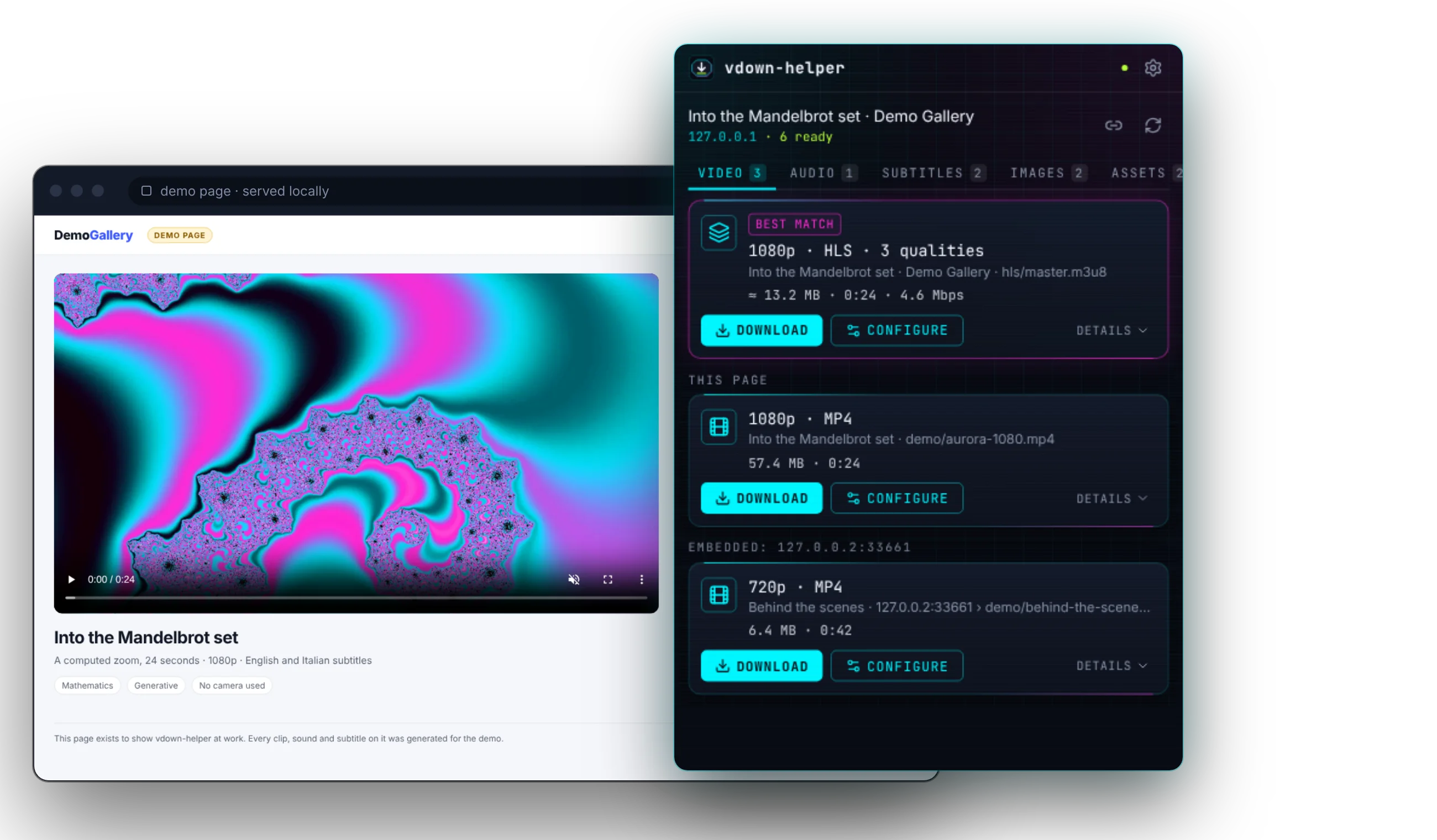
The vdown-helper popup open on a demo video page, with the 1080p stream marked as best match
0trackers
0accounts
0video re-encoding
110+end-to-end checks in a real browser, on every change

“Save video as…” stopped working years ago.

Today a video arrives in hundreds of pieces, hides inside a player embedded from another site, or is assembled in memory while it plays. vdown-helper reads the page the way the player does — and hands you one clean file.

01 · Detect

The right file, on top.

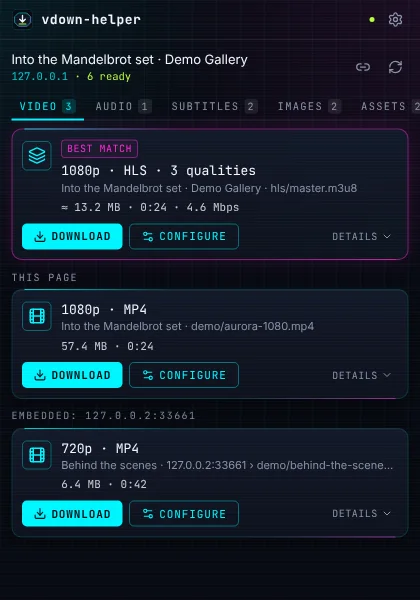
Direct files, HLS and DASH streams, subtitles, images and documents, from every frame of the page. Each card leads with what matters — quality, kind, size, length — and the best match comes first, with its Download one click away.

The popup listing a 1080p HLS stream as best match, a 1080p MP4 and a 720p clip from an embedded player

02 · Decode

Streams in. One clean file out.

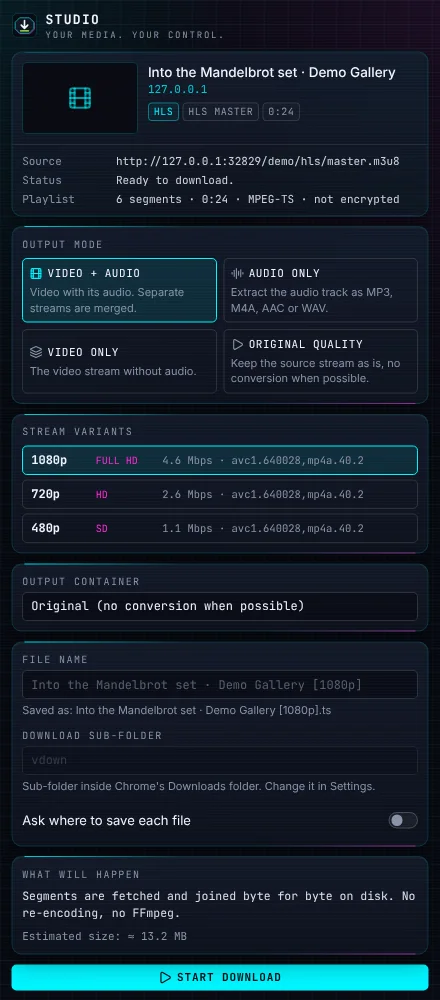
Pick the quality, the audio track and the format, or keep the original. Segments are joined as they are: the picture is never re-encoded. Audio conversion (MP3, M4A, AAC, WAV) runs on FFmpeg inside your browser.

The Studio side panel with the stream's three qualities, output mode and file name

03 · Download

Real progress. Real files.

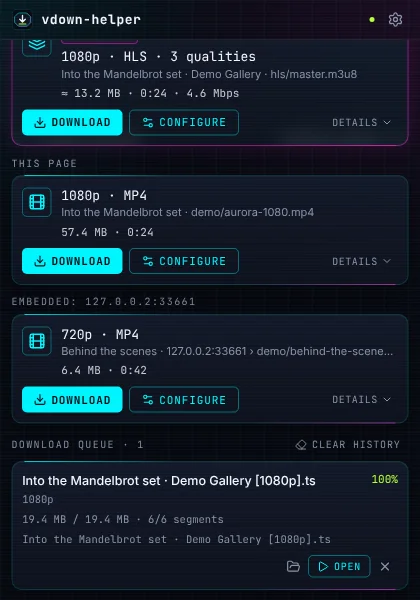
Every stage is shown as it happens — downloading, joining, done — with speed and time left. Pause and resume, retry what failed, then open the file or its folder straight from the popup.

The download queue with a finished file and its Open button

04 · Record

Live right now? Record it.

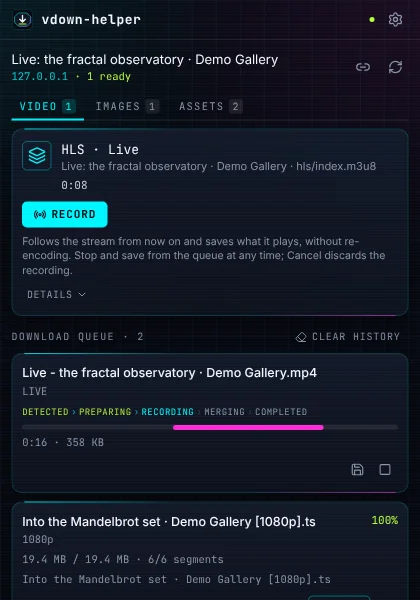
Live HLS and DASH streams, camera, screen-share and call streams are recorded as they play. Stop whenever you like and what was recorded is saved; limits on length and size stop it for you.

A live stream card with Record, and a recording in progress with its elapsed time and size

05 · Respect

Private by design. Honest about DRM.

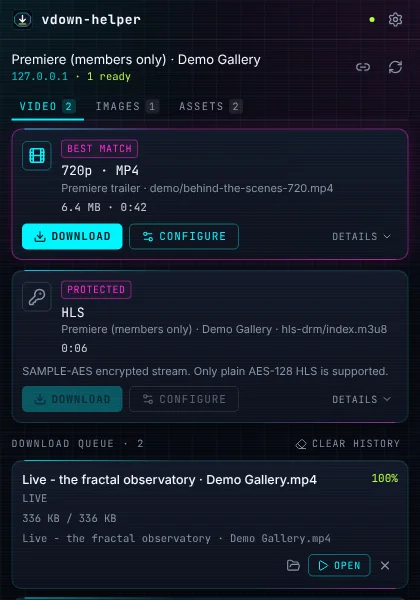
No account, no analytics, nothing sent anywhere. Site access is asked for only when you click, and can be revoked in one place. Streams protected by DRM are marked as such and never touched.

A free trailer marked as best match and a DRM-protected film marked Protected, with its Download disabled

Everything a page can play

  • Direct files

    MP4, WebM, MKV, MOV, MP3, M4A, FLAC, Opus and more — saved as they are.

  • HLS

    Master and media playlists, separate audio, fMP4 and TS, AES-128 encryption whose key the site delivers openly.

  • MPEG-DASH

    Static and live manifests, separate audio and video, ClearKey.

  • Players that build video in memory

    When there is no file at all, it captures what the player plays — fast or in real time.

  • Live broadcasts

    Record live HLS and DASH as they go, with gaps counted, never hidden.

  • Camera, screen and calls

    MediaStreams on the page are recorded to WebM (or MP4 where Chrome can).

  • Subtitles

    VTT, SRT, TTML and subtitle tracks inside streams.

  • Images and documents

    Filter by size, pick what you want, download one by one or as a ZIP.

Your media. Your control.

It works for you. It reports to no one.

  • No account and no sign-in

    Install it and use it. There is nothing to register for.

  • No analytics, no telemetry

    The extension never sends the pages you visit, or anything else, to any server.

  • Permissions on your click

    Access to a site is asked for when you press a button, one site or all of them, and revoked in one place.

  • Everything runs locally

    Detection, joining and conversion happen inside your browser. Even this page loads nothing from anyone else.

What it will not do

  • Bypass DRM. Widevine, PlayReady, FairPlay and SAMPLE-AES streams are marked Protected and refused — for downloads, captures and recordings.
  • Get past logins, paywalls or a site's own checks. It saves what your browser already plays.
  • Use tricks for particular websites. It works from what the page itself shows the browser.
  • Make it legal. Save only what you have the right to save.

Up and running in 30 seconds

Chrome Web Store listing coming soon. Until then: download, unzip, load. 30 seconds.

  1. 1

    Download

    Get the latest package from GitHub.

    Download for Chrome — free
  2. 2

    Unzip

    Extract it into a folder you will keep.

  3. 3

    Load it

    Open chrome://extensions, switch on Developer mode, choose “Load unpacked” and pick the folder.

    chrome://extensions

All releases and checksums →

The desktop companion

For very large files and long streams: downloads, merges and conversions run outside the browser, keep going after Chrome closes, and the extension can hand jobs over to it. It is optional: the extension works on its own.

Windows

Windows 10 (1809) or later

Download for Windows

ARM64 installer MSI (x64) MSI (ARM64)

macOS

macOS 11 or later, Intel and Apple Silicon

Download for macOS

Linux

x86-64, with WebKitGTK 4.1 (Ubuntu 22.04 or later)

Download AppImage

.deb package .rpm package

The installers are not signed yet: Windows SmartScreen and macOS ask before the first start (on macOS, right-click the app and choose Open).

They include ffmpeg, which is GPL software; its licence and source references are in the app's licenses folder.

All releases and checksums →

Questions

Is it free?

Yes, completely, and the source code is open (MIT licence). There is no paid tier and no account.

Will it save any video on any site?

It saves what a page plays in your browser, in the formats listed above. It does not bypass DRM, logins or paywalls, and some players simply never expose a stream. When something cannot be saved, the card tells you why.

Why does it ask for access to a site?

Reading a page you are on needs nothing. Fetching a stream from another server, or looking into a player embedded from another site, needs that site's permission — asked when you press the button, revocable in Settings.

Does it reduce the quality?

No. Video is never re-encoded: segments are joined as they are. Only audio is converted, and only if you ask for MP3, M4A, AAC or WAV.

Where do the files go?

Into Chrome's own Downloads folder, through Chrome's download manager. You can pick a sub-folder or be asked every time.

Does it send anything anywhere?

No. No analytics, no telemetry, no remote code. The only requests it makes are the ones that fetch the media you asked for.

Which browsers does it support?

Google Chrome 116 or newer.

Stop hunting for the file.

Open the popup. Press Download. That is it.

Download for Chrome — free

Chrome 116 or newer · free · nothing to sign up for